



How to Order
Finding the right product
Ordering from classicachievements.com is easy. We are also here to help so you can call us during business hours to speak with one of our representatives to assist you through the order process. We have put together this How to Order diagram to also assist. Follow these steps to better understanding of how to navigate our site when placing your order. Products can also be found by searching from the Search Field or by using the Category and Sub-Categories at the left side of the web page.
First, let's discuss using the Search Field
The Search Field is found in the upper right hand section of the web page. You can either type in the Product Name or SKU# if these are known. For this example will search for the PL893 (Years of Service) Plaque.

Once you begin entering the SKU# in the field, products will begin to appear. The PL893 should show up at the top of the list. Click on the product image and you will be taken to the product description/order screen. It should look like this.
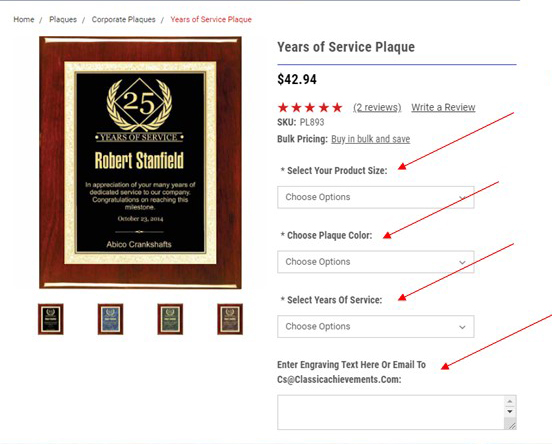
From this screen, you can select options applicable to the product you're ordering. Options consist of Product Size and Product Color to name a few. Here you can also upload text and logo to personalize your product. Once you've added all options desired, you will need to tell us when you need to receive your product. This is known as your "In-Hands Date". If a product does not have this option listed, write the in-hands date in the comments section on the order form.

Now you are ready to add the product to the cart and follow the final steps through the Checkout process. The other way to find the right product on our website is to use the Category and Sub-Category search links found at the left side of the web page. In the example below, we will search the "Plaques Category".

From the "Plaques" Category The Category